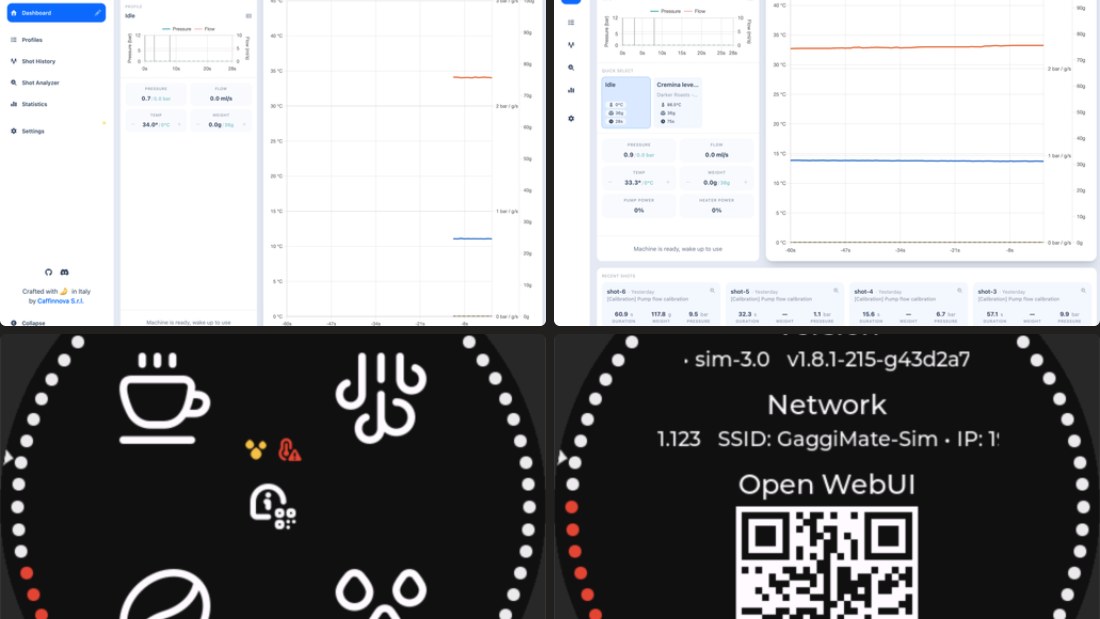
Gaggimate v1.9.0 came out on September 29, 2026. It is the first stable release since v1.8.1 in May, and the changelog is long, with work from the core team and eleven first-time contributors.
The official release notes are only a list of pull requests, so I went through them and sorted out what actually changes at the machine. This is the first post in my new Gaggimate Updates series, where I do that for every bigger release.
Quick answer: should you update?
Yes, if you use the web interface or shot history. The warnings, the shot comparison, and the more precise water measurement make it a big usability jump.
Update the display and the controller together. The two boards now talk over a new protocol, and mixed versions will not work properly. More on that at the end.
The machine now warns you before things go wrong
The most useful new feature for daily brewing is the warnings system. Gaggimate can now check:
- water level
- temperature stability
- the steam switch
- flushing
- scale connection
- scale battery
For each one you choose whether it is ignored, shown as a warning, or treated as an error. Warnings appear on the display and in the web UI. If an error is active and you start a shot, the machine asks you to confirm first.
That sounds small, but it catches the classic morning mistakes: brewing with the steam switch still on, pulling a shot before the temperature has settled, or a scale that quietly ran out of battery so stop-by-weight never triggers. If you use a Bluetooth scale, pair this with the battery warning. I compared scales in Bookoo vs MyScale for Gaggimate.
Buttons can do more
The physical buttons, one of my favorite things about Gaggimate, got reworked:
- Press and hold to flush, with a flush duration you can set.
- Button combinations for brew and steam.
- Long-press actions.
On a Gaggia Classic, a quick flush before every shot is part of the routine, so doing it with one long press instead of the display is a nice workflow win.
Better shot data
This is where 1.9 changes the most if you like to look at graphs.
- Precise water volume. Shot history now records the water the pump actually delivered, at 0.1 ml resolution, instead of estimating it. Profile phases that stop at a water volume use this value too.
- Puck resistance and liquid resistance. Two new metrics in the shot analyzer, statistics, and comparison. They help you see whether a shot choked or ran fast because of the grind, the puck prep, or the profile.
- Shot compare. You can put two shots side by side or overlay them. That is exactly what you want when you change one variable, like grind size or dose, and want to see what happened.
- Pinning. Pin favorite profiles and shots so they stay at the top.
- Shot history timestamps were fixed, the sharing options were improved, and the analyzer chart works better on a phone.
A dashboard you can arrange
The web UI got a big overhaul. On a new Dashboard Settings page you can reorder or hide panels and metrics. There are new cards for water tank level, recent shots, and favorite profiles, so you can start your go-to profile with one tap. Live status now also shows pump power and heater power.
Smaller changes: a navigation you can collapse, a system theme option, a cleaner settings page, drag-and-drop ordering for profiles, and a description field on each profile.
Import profiles from Decent and Meticulous
If you find a great profile online, chances are it was written for a Decent or a Meticulous. 1.9 adds a Meticulous JSON importer and repairs the Decent profile converter. You can also choose a startup profile that is loaded when the machine turns on.
Safer WiFi and more reliable updates
- Secure access point. The WiFi hotspot Gaggimate opens for setup now gets an automatically generated password, and the QR code on the display includes it. You scan the code and you are connected. Setup over a USB cable using Improv Serial is also supported now.
- Sturdier OTA updates. Interrupted downloads can resume, incomplete firmware is detected, and a failed update shows a clear screen instead of leaving you guessing.
- Web UI inside the firmware. The web interface is now part of the firmware image, which makes updating simpler.
- Bluetooth reconnects were fixed in several places, and a memory issue that could hang the update check is gone.
Under the hood
These mostly matter to tinkerers and developers:
- A new communication protocol between the display and the controller, with a clear notice on the standby screen when the versions do not match.
- Support for gear pumps controlled over I2C, plus tuning settings for positive displacement pumps and fixes to pump flow calibration.
- A new PID autotune rule, a pressure offset setting, and the scale battery level in the API.
- A desktop emulator that runs the display firmware and web UI on macOS or Linux with simulated sensors. The two round display screenshots at the top are from it.
- The display interface is now built with EEZ Studio.
How to update
- Save your profiles first. Nothing in the release notes says you will lose them, but a backup costs you a minute.
- Update both boards. Display and controller have to run 1.9 together because of the new protocol. If they do not match, the display tells you on the standby screen, and the controller can be brought up to date over the air.
- Use OTA or the web flasher. If OTA fails or you are coming from a much older version, the web flasher has separate buttons for display and controller. It only works in Chrome, Edge, or Opera, and you may have to hold the BOOT button while plugging in the USB cable.
The web flasher only supports the standard hardware. If you built your own board, you flash with PlatformIO over USB.
My take
Gaggimate 1.9 does not add a single headline feature. It adds dozens of things that make the machine easier to live with: it warns you before a bad shot, the buttons do more, and the data is finally precise enough to compare shots properly. For a Gaggia Classic, that is exactly the kind of update you want.
If you are still deciding whether the mod is worth it at all, read my Gaggimate review after six months.